Stop Blaming the Box: A Wired-Network Health Check for UK IPTV
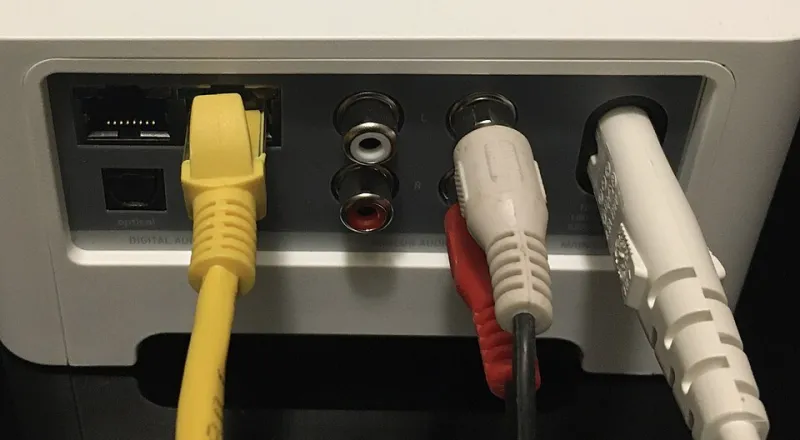
Photo: Pittigrilli, CC BY-SA 4.0, via Wikimedia Commons
Your streaming box is the easy suspect. It reboots at 8:58pm, the picture turns into Lego bricks during the second half, and the first instinct is to blame the app, the service or the box itself. In plenty of UK homes, the real weak point is the Wi-Fi link between the box and the router — especially when the router sits in the hallway, the telly is in a bay-fronted front room, and there is a chimney breast doing its best impression of a Faraday cage.
At Modaiptv we are not anti-Wi-Fi. A good mesh system can be brilliant. But for live IPTV, especially sport and anything with a kick-off time, wired Ethernet is still the boring, reliable answer. The cable you already own — or the one you can buy for less than a takeaway — often fixes more than a new box ever will.
Speed is not the whole story
A speed test can show 300Mbps and still leave you with a stream that stutters every 40 seconds. Live IPTV cares about consistency: latency, jitter and packet loss. Jitter is the wobble in how long packets take to arrive. High jitter makes live telly feel like it is breathing in and out. Packet loss does the rest.
Wi-Fi is a shared airwave. Neighbours, microwaves, baby monitors, wireless doorbells and even fish tanks can affect it. Ethernet is a private road. It is not glamorous, but it is predictable.
The two-room reality check
Do not test from the sofa with your phone and call it a day. Test in the actual TV position, at the actual time you watch. Here is a simple routine:
- Put a laptop or phone on the same Wi-Fi network as the streaming box, right next to the telly.
- Run a ping test to a reliable address for 60 seconds. On Windows: ping -n 60 1.1.1.1. On Mac or Linux: ping -c 60 1.1.1.1.
- Note the average latency, the jitter — the up-and-down gap between pings — and any packet loss.
- Repeat the test with a long Ethernet cable trailing across the floor, just temporarily.
On a decent wired connection you would expect average latency in the low teens or better, jitter under 5ms and zero packet loss. On Wi-Fi, a jitter figure that hops from 3ms to 40ms is a red flag for live telly. If the wired test calms the numbers, stop negotiating with Wi-Fi. You have your answer.
Victorian terraces, thick walls and awkward hallways
Older UK housing is charming until you try to push a reliable signal through it. Internal brick walls, foil-backed plasterboard, chimney breasts, cellars and long narrow hallways all take their toll. New-builds have their own problem: insulation and foil can turn a room into a signal shadow.
A few sensible routes exist. Lift a floorboard or two and run cable underneath. Tuck it along the top of skirting and cover it with trunking. Run it up into the loft and drop it down the other side. If you are brave and the wall is sensible, take it outside and back in again with proper external cable. Trunking is not a defeat. It is cheaper than a divorce lawyer and far less messy.
Avoid flat cable under carpets if you can. It looks neat for a week, then gets crushed, kinked or stapled through. If you must use it, do not staple it, do not trap it under a door and do not expect it to survive a heavy sofa.
When powerline is worth it, and when it is not
Powerline adapters are the classic compromise. They send data over the mains wiring, which sounds like magic and sometimes behaves like it. In a modern house on a clean ring main they can be fine. In older wiring, or when a washing machine, treadmill or cheap phone charger is on the same circuit, they can crawl or drop out.
Buy powerline from somewhere with a returns policy and test at 8pm, not 11am. If the numbers are stable during peak telly time, they are usable. If the adapter has a pass-through socket, use it. Do not plug powerline adapters into extension leads if you can avoid it.
Mesh is the other option. A mesh node near the TV can help, but a wireless backhaul is still wireless. If you can wire the mesh node back to the router, do that. A mesh system is not a magic wand for one stubborn telly; it is a whole-home Wi-Fi upgrade. If only one room is the problem, a cable is usually cheaper.
A no-nonsense shopping list
- Cat 5e or Cat 6 patch cable in the right length. Cat 6 is nice, but Cat 5e is fine for most homes. Avoid suspiciously cheap copper-clad aluminium cable.
- A small unmanaged gigabit switch if one wall port needs to feed both a TV and a streaming box.
- Keystone jacks and faceplates if you want a permanent, tidy job.
- USB-to-Ethernet adapter for a Fire TV Stick or similar dongle-style box. Check the compatibility list before buying; not every adapter is recognised.
- White trunking, cable clips and a few cable ties. The clip budget is always higher than you think.
- A powerline kit with pass-through sockets only if cable really is impossible. Keep the receipt.
- A basic cable tester if you are crimping your own ends. It saves an evening of swearing.
Set it up properly
Wire the box, then turn off Wi-Fi in the box settings if the option exists. Reboot the router and the box. Retest. Label the cable at both ends. If you need to share one connection, use a small switch rather than swapping cables every night. Avoid daisy-chaining three cheap switches just because they were in a drawer.
Wired networking is not exciting. That is the point. It is the difference between a box that behaves and a box that gets blamed for the broadband's bad night. Before you spend on new hardware, spend ten minutes with a cable and a ping test. Your IPTV will thank you.