Turn Up the Dialogue, Not the Explosions: A UK Streaming Audio Check-Up
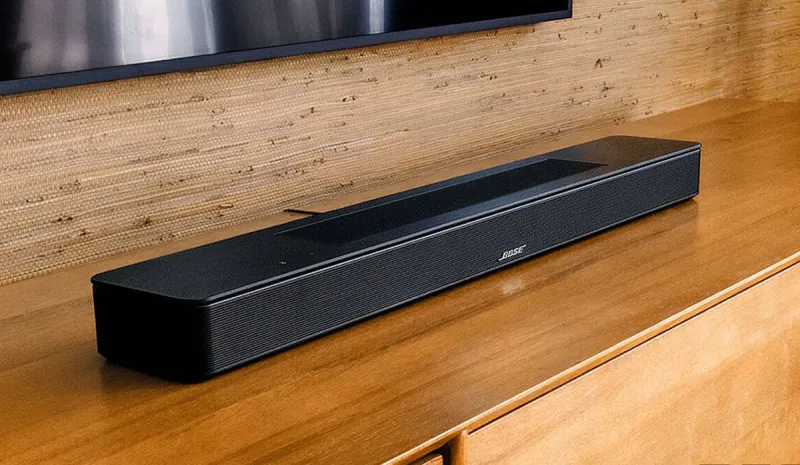
Photo: soundbar TV living room dialogue voice mode remote UK, via s.yimg.com
You are not going mad. The explosion rattles the windows, the soundtrack swells like a cathedral, and then two characters have a crucial conversation in a kitchen and it sounds like they are mumbling through a duvet. This is the most common audio complaint in UK streaming setups, and it is rarely about the stream being quietly broken. It is usually a chain of settings, each one making speech a little less important than effects.
At Modaiptv, we think dialogue clarity deserves its own troubleshooting checklist. Here is the opinionated version: start with the simple stuff, stop blaming your ears, and do not accept a setup where you need subtitles for every second scene unless you actually want them.
First, prove whether it is the mix or your kit
Turn subtitles on for five minutes. If the subtitles reveal lines you genuinely could not hear, the problem is the audio mix or your settings, not your hearing. That is useful because it gives you a baseline. If dialogue is clear on BBC iPlayer but muddy on one streaming app, the issue is probably app or format related. If it is muddy everywhere, look at your TV, soundbar or box settings.
Try the same scene on two sources. A UK drama on iPlayer, a film on Netflix and a live channel through your IPTV app will not all behave identically. If one source is fine and another is not, do not rebuild your whole living room. Adjust the weakest link first.
The downmix decision nobody makes on purpose
Dialogue mostly lives in the centre channel of a surround mix. If your setup is stereo, the downmix has to fold that centre channel into the left and right speakers without burying it. Some TVs and boxes do this well. Some do it badly. Some do it differently depending on whether the source is Dolby Digital, Dolby Digital Plus or PCM.
If you are using a stereo TV, a stereo soundbar or headphones, set the source to stereo or PCM where possible and compare. On some devices, forcing PCM can clean up speech because you are asking the TV to decode and downmix rather than passing a surround stream to a soundbar that then makes a mess of it. On others, passthrough sounds better. There is no universal answer, which is why you have to test rather than blindly copying a forum post.
If you have a proper surround setup, check the centre channel level. It is the most boring fix on this list and the most effective. Effects should not overwhelm speech just because the subwoofer is feeling dramatic.
Loudness normalisation and night mode are your friends, sometimes
Many TVs, soundbars and streaming apps offer loudness normalisation, night mode or dynamic range compression. These features turn down the loud bits and lift the quiet bits. For dialogue clarity, that is often exactly what you want. For a film with a carefully built soundtrack, it can flatten the drama. You are allowed to choose practicality over purity.
Try night mode on a dialogue-heavy episode and see whether speech becomes easier to follow without the action scenes sounding tiny. If it helps, leave it on for drama and turn it off for films where you want the full dynamic range. The setting is not a moral failure. It is a tool.
Soundbar modes can be the villain
A soundbar in movie mode may boost bass and widen the soundstage, which is great for a car chase and terrible for a kitchen argument. Look for a voice, dialogue or clarity mode. If your bar has a centre channel level, nudge it up before you start shopping for a new one. If it has a subwoofer level, consider whether the bass is overwhelming the midrange.
Also check the bar's input format. If it is receiving a surround stream it cannot decode properly, it may downmix badly. Switching the TV output to PCM or stereo can be a quick diagnostic. If speech suddenly improves, you have found the problem area.
Fire TV, Android TV and smart TV menus
On Fire TV, look in Settings, then Display and Sounds, then Audio. Check the audio output options and try PCM versus Auto or Dolby Digital Plus. On Android TV and Google TV, the digital audio output setting often has Auto, PCM and Pass-through. Auto is convenient but not always best. Pass-through is for receivers and soundbars that can decode the format. PCM is the safe diagnostic choice.
On Samsung and LG TVs, the relevant menus vary by model, but look for digital audio output format, sound mode and any clear voice or dialogue enhancer options. If you are using HDMI ARC or eARC, check that the TV and soundbar agree on the format. An optical cable is fine, but it has limits, and some formats will be downmixed before they reach the bar.
Subtitles are not a defeat
UK viewers often treat subtitles as a last resort. They should not. Subtitles are a legitimate accessibility feature and a brilliant diagnostic tool. If you need them for one badly mixed film, fine. If you need them for every episode of every drama, something in your setup is wrong.
Check subtitle size and background settings too. A huge opaque box can cover half the picture, while tiny white text vanishes against a bright scene. Most apps let you adjust this, and it makes a real difference during a long series.
A five-minute clinic
Start with one dialogue-heavy scene. Turn subtitles on and confirm the problem. Try PCM or stereo output on the TV or streaming box. Check the soundbar mode and centre level. Try night mode or loudness normalisation. If the source is a surround stream and your kit is stereo, force a stereo downmix and compare. Then repeat the scene with the original settings so you are not fooling yourself.
If speech is still lost after that, the mix itself may be poor. In 2026, streaming audio is not uniformly excellent, and some apps are worse than others. But before you blame the service, make sure your TV is not set to a mode that treats dialogue as background noise. A good UK streaming setup should let you follow the argument without waking the neighbours every time a car door closes.